Color Label Solutions

Color Label Solutions
www.colorlabelsolutions.com

Saturday, March 3, 2018

5 Ways To Save On Labels

This week, I presented "5 Ways To Save On Labels" at Marijuana Media's, "Packaging, Labeling, and Tips on How To Save Money" seminar in LA:


5 Ways To Save On Labels


http://marijuanamedia.com/marijuana-packaging-labeling-revolution-ahead-ca/

And I had a table with printers and label samples:


Color Label Solutions at Marijuana Media
Guy Mikel Presenting

In addition to myself speaking on labels, Joel Bessmer, who led the event had presenters covering Regulatory, Packaging and Legal aspects of labels for cannabis providers in California.  If you are interested in the presentations, you can get them here:

http://marijuanamedia.com/marijuana-packaging-labeling-revolution-ahead-ca/

As you all purchase and use labels, I encourage you to review my presentation.  You may find an idea that would save you money on your purchase of labels; including from us. To see the presentation, go to SlideShare:

https://www.slideshare.net/GuyMikel1/5-ways-to-save-on-labels

To summarize my presentation, the topics I covered were as follows:


  1. Preprint vs On-Demand: Depends on the number of SKU's
  2. Variable Data Usage:  Depends on the number of SKU's on how to approach
  3. Size Selection: Standard Sizes vs Custom Sizes depends on order quantity
  4. Order Quantity: Small Initial Orders vs Annual Orders
  5. Durability Requirement: Paper vs Synthetic
In addition, I provided two bonus ways to save on labels:

  • Manual vs Semi-Automatic vs Automatic application (watch the video on label applications on tubes)
  • Trusted Reseller (like us!)
But please go through the presentation and contact us if you have questions on any of the topics.  Or contact us if you want to save money on your labels.

Guy Mikel
855-962-7670

Saturday, February 10, 2018

WestPack 2018 Launch

At WestPack 2018 in Anaheim, CA, we launched the NS Multi, the on-demand color box printer from New Solutions in Portugal. www.printboxesondemand.com 


Color Label Solutions and the NS Multi at WestPack 2018

Although we spoke to many people about label printing, most of our time was spent with people interested in printing boxes in color, and on-demand.  From this experience, I have 3 key observations that I would like to share with you.

NS Multi Printed Box


First the NS Multi produces beautiful print quality.  In the picture above, we printed on a pre-cut box with a white face and coated with an inkjet receptive coating.  The print quality, which is up to 1600 x 1600 DPI is fantastic when using the inkjet coating.  Here is the print on our locally coated off-white box:


Inkjet Coated Box Printed by the NS Multi
In this print, you can see the individual feathers on the birds.  And no pixelated dots in our Color Label Solutions logo.  On the inkjet coating, the print quality is great.

Even on Kraft boxes, the print quality is very good; and probably good enough for many applications.

NS Multi Printed Kraft Box
But the same artwork on the white, inkjet coated side looked very nice.


At WestPack, we made a stack/pillar of printed boxes on top of the NS Multi:

NS Multi Printed Box Stack
Second, the NS Multi will help many companies manage their inventory of empty boxes.  I spoke with several companies who had lots of SKU’s; and needed a different approach to box inventory management.  One company told me that they had 550 SKU’s with many hundreds of different boxes.  With so many SKU’s, this company had to purchase a large quantity of each box, and keep stacks and stacks of boxes in their warehouse.  

Plus, they had to pick the boxes they require every day from their inventory.  And the company has problems with obsolete inventory of boxes as their artwork and products constantly change.  By using the NS Multi, this company can eliminate obsolete inventory and can reduce their inventory of boxes to as low as 4 to 5.

NS Multi On Pallet Arriving at WestPack
Third, I was surprised by the number of people who wanted/needed some number of boxes printed.  These companies need a very short run of boxes; printed with their individual artwork.  Some of these people had very small companies, but still wanted good looking boxes in small quantities.  And some of these companies needed an initial short run for testing of new products.  It’s clear that a lot of opportunity exists for short run box production.

Overall, the NS Multi produces beautiful print output; and is perfect for companies with lots of SKU’s or companies who want to print boxes in short runs for their customers.  Two great targets for this new device.

To learn more about the NS Multi, read my previous post on this printer:


Or my post on Label Expo Europe where I first saw the printer:


WestPack was not only good for us at Color Label Solutions because of the launch of the Multi, but also everyone who attended the show wore our 10 Pt gloss paper badge:

WestPack 10 Pt Gloss Paper Badge
Doesn’t it look great!  I’m excited the badges turned out so well.

If you have a lot of SKU’s and are in need of a box solution, or want to print boxes in color and on-demand for your customers, contact us to discuss how the NS Multi will meet your requirements.  After seeing how well their printer works, I’m convinced the NS Multi is a great fit for companies like yours.

Guy Mikel
855-962-7670

Thursday, January 11, 2018

CES 2018

This week, I attended the 2018 Consumer Electronic Show  in Las Vegas.  CES is the world's gathering place for all those who thrive on the business of consumer technologies. With approximately 170,000 attendees and 3,900 exhibitors, CES is the world’s largest tradeshow.

But I did not go to see what Google, Amazon or what others were launching; rather to see print on-demand badge printing in action.

C3500 Badge Printers at CES
CompuSystems, www.compusystems.comprovided the registration solution, including identification badges, for CES.  Founded in 1976, CompuSystems has enjoyed many years as a major registration service provider for the trade show industry. They offer integrated software that meets the specific needs of their clients, creating an ecosystem that fosters the buyer and seller relationship.

If you follow my blog, you may remember this earlier post covering CompuSystems’ move to print on-demand color badges:


During my short visit at the end of the 2nd day, I found the solution that CompuSystems built for CES amazing.  According to Jeremy Kubik, Director of IT for CompuSystems, “we constructed and managed 19 different registration locations in Las Vegas for CES; including not only the main registration tent and the various halls of the convention center, but also in hotels across Las Vegas. We even had three registration areas at the airport.”

CES Main Registration Tent
At the various locations, the CompuSystems team setup carts that included a computer, printer and wireless router to connect to the servers running BarTender.  CompuSystems added these locations just prior to the show including the VPN networks to handle all of the data.  Here was the cart running at one of the hotel locations.

Registration Badge Cart at CES
In addition to the network of registration desks, Jeremy and his team used BarTender to create the template and add the variable data to the badges.  The badges included fixed images such as the CES logo and an advertisement on the back panel, but also variable data including a picture which was required for all attendees.  For example, attendees could upload an image prior to the event, use the CES application on their phone, or capture a picture during registration using a small HD web camera:

Camera for Badges
And all of the images were verified instantaneously by an application to confirm the picture was a face.

Also, CompuSystems added a lot of variable data; such as name, company, city and QR code for lead retrieval. In addition, they added color-coded bars for the type of attendee or exhibitor (13 total types).

CES Print On-Demand Color Badges
For the badges, CompuSystems used a 4” x 12” matte poly tag with a crease in the middle to enable front/back printing.  I thought these poly badges printed great; including the images.  For example, the WHOA image, the CES mark for the 2018 show, look great.

WHOA CES 2018
WHOA CES 2018
Or the advertisement on the back panel:

CES Badge Advertisement
After attending CES 2018, I believe Jeremy and the team at CompuSystems deserve an “atta-a-boy” for their work and their on-demand badge solution for the CES show. I can’t imagine the pressure of having hundreds of thousands of people waiting for badges at a trade show; I’m glad the printers and badges worked great.

Guy Mikel at CES 2018
If you want badges for your next tradeshow, pick them up from us here at Color Label Solutions.

Guy Mikel
855-962-7670

Thursday, December 28, 2017

Best of 2017


During 2017, we published 31 original (32 if you count this one) posts on 

www.colorlabelsondemand.blogspot.com

which was more than our goal for the year.  As most of you don’t read every post, I’d though you might find a summary of these posts of interest.

Love's Oven Labels
Love's Oven Labels
As for most read, two stick out.  First, the post that was read the most covered Love Oven’s use of the C7500G.  These guys produce great looking, full-bleed labels. 

http://colorlabelsondemand.blogspot.com/2017/03/edible-love.html.   

Plus, I love how Katie from Love’s Oven built the printing solution herself.  Good work!

L301 label printer Afinia
L301 from Afinia
Second, the next most read post of 2017 was my review of the new L301 color label printer.  This printer produces great looking labels; at the most affordable hardware price of any label printer we sell.  

http://colorlabelsondemand.blogspot.com/2017/02/l301.html.

Color Badge Tag Printers
But the most read does not always represent my favorites.  My favorites are reserved for customers who have built and implemented great label printing solutions.  My two favorites for 2017 have us and BarTender in common.  First, CompuSystems built a great solution using BarTender and the C3500 for printing badges in color and on-demand:  

http://colorlabelsondemand.blogspot.com/2017/06/on-demand-color-badges.html.  

Plus, we worked hard to put together badge options; including matte paper, gloss paper and matte poly tags.  These different tags produce great looking badges.

Quickscrew Label
Quickscrew Label

Second, the Quickscrews used BarTender to pull text, images, color-codes and barcode data from their database to produce labels for 10’s of thousands of SKU’s. As the name of the post states, it’s the perfect example of a print on-demand color label solution.  

http://colorlabelsondemand.blogspot.com/2017/05/perfect-print-on-demand-color-label.html.

LX2000 vs C7500 Ink Cartridge


By far the most controversial post was my analysis of the differences between the C7500 and the LX2000.  As you may know, I add posts to Linked In after publishing.  On Linked In, this post created a lot of comments about the comparison, including one from the VP of Sales from Primera.  What do you think of this analysis? 

http://colorlabelsondemand.blogspot.com/2017/09/lx2000-vs-c7500.html

Guy Mikel at Label Expo Europe
And by far the most difficult post was the report on my visit to Label Expo Europe.  Lots of pictures, video’s and links which make posting a lot more difficult. But I found the Expo very valuable.  See my perspective of the show here: 

http://colorlabelsondemand.blogspot.com/2017/09/label-expo-europe-2017.html

And in this post, you’ll see the new printer we’re launching at WestPack 2018 in Anaheim February 6 to 8.

I enjoy posting my opinions and customer stories covering printing color labels on-demand; It takes work.  But your readership of these posts is the real payoff for this effort.  To date, Google says we have 320,000 page-views from individuals all over the world.  I appreciate your readership; and I hope you find the information in these articles valuable.  May you have a great 2018.

Guy Mikel
855-962-9670

Monday, December 18, 2017

Affordable Digital Label Solution

If you are one of the two following types of companies:

  • A printer who wants to start printing professional looking labels
  • A manufacturer with lots of SKU’s who needs a large variety of sizes/types of labels


And neither one of these types of companies want to spend a lot of money.


We have a great solution for you; the C7500G combined with the Eclipse Mini Finishing Station.

Eclipse Mini Finishing Station
For approximately $20,000, you can now print, laminate, die-cut and weed labels up to 4.25” wide; that look similar to labels produced by very expensive presses. 

I first saw the Eclipse Mini at Label Expo Europe.  Read about the Eclipse Mini here:  http://colorlabelsondemand.blogspot.com/2017/09/label-expo-europe-2017.html

Recently, I had the Eclipse Digital Label Finishing Machines, http://www.impressiontechnologyeurope.com/eclipse.html , which is a division of Impression Europe, print and finish labels for us.  Watch here the C7500G print labels:


By printing multi up, you can print any width labels up to 4.25” wide and up to 22” long using the C7500G in continuous mode; and combined with the Eclipse Mini Finishing Station.  Watch the Eclipse Mini finish these same labels here:


And you get great looking labels:

C7500G/Eclipse Mini Finished Labels

In addition to printing great looking, durable labels, you can produce labels relatively easily.  The most difficult aspect of printing/finishing the labels with the C7500G and Eclipse Mini is the process requires someone who understands Adobe Illustrator or Corel Draw.  You need this expertise to add the die lines on the label artwork.  Once the correct die line template is establish, you use this same setup on each label of the same size.  If interested, we can send you the instructions to create the cut-line graphic for the Eclipse Mini.

The C7500G is the most affordable and easy to use means to produce professionally-looking and durable labels available.  If you are a printer who wants to start selling great looking labels, or a manufacturer with lots of SKU’s who wants to produce professionally looking labels in house, consider the C7500G and Eclipse Mini solution.

Guy Mikel
855-962-7670

Sunday, December 3, 2017

Seattle Cannabis

While traveling in Seattle, I had the opportunity to meet two of our customers in the cannabis market: Green Rush Cannabis and Georgetown Cannabis.


Green Rush Cannabis, http://catchtherush.com/,   is a WA i502 producer-processor located in the scenic Snohomish Valley. They produce a clean, sophisticated crop that has become a preferred brand for a number of top shops in Washington state known for their consistent terpene flavor, high quality, and deep impact.  GreenRush Cannabis is a recommend brand by expert budtenders.

Green Rush Cannabis
Green Rush Cannabis
Personally, I found Green Rush’s growing rooms, very clean and professional.

Mark Flanders, owner of Green Rush Cannabis, and I first met at Cannacon Seattle in February 2017.  At the time, Mark was looking for a means to print labels for their products with their logo, text and variable data.  Initially, Mark was looking for 4x2” and 3x2” matte or gloss paper labels produced on an affordable color label printer.  Based on these requirements, I recommended the C3500 printer.

Mark Flanders, Green Rush Cannabis
After initially testing the paper, we found the labels “flagged” and came off the joint tubes. This flagging is not a result of the adhesive, rather the memory in the paper.  Based on these results, we switched to matte poly labels that have less memory and work better on the tubes.

Green Rush C3500 Label
In our discussions, I learned that Green Rush uses Grow Flow, https://getgrowflow.com/traceability and sales system.  According to Mark, “to produce our labels, we requested GrowFlow to design our label templates.  Inside GrowFlow, the variable data is pulled and sent to a format that is produced as a PDF.  This system works great for us”.

The Green Rush label artwork is perfect for the C3500.  It’s a basic white label with a logo, text, barcode and variable data.  For this application, the C3500 works great.  And the integration with GrowFlow is a great addition, adding value to their customers.

Based on their success, Green Rush is expanding.  Mark says, “We’re setting up another location, to cultivate as well extract.”  Based on my experience, I can see why Green Rush is a success.

Georgetown Cannabis Company, http://georgetowncannabisco.com/, experienced team is passionate about the cultivation of their naturally grown cannabis.  They trim their buds to ensure quality and bag appeal.  Georgetown cultivates cannabis as natural as possible, and staying away from pesticides with the use of beneficial insects. Though innovative growing methods and their no shortcut approach, Georgetown strives to bring their brand, “Legion of Plume” of high quality, cannabis to their customers.
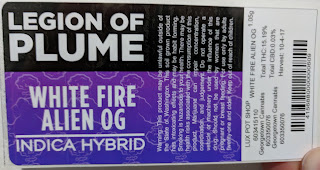
Georgetown Cannabis "Legion of Plume " Label
I met Mark Brown, CEO, of Georgetown Cannabis originally via one of our partners.  Initially, Mark was looking not only for a label printer, but a label applicator as well.  Mark and his team, especially, Kendall Brown, were requiring a high resolution printer for labels for their “Legion of Plume” branded products.  Based on their label printing requirements, Georgetown purchased a C7500G printer and matte poly labels.  I recommended matte poly given Georgetown’s production of a lot of prerolls, labeling their joint tubes.

Georgetown Cannabis Prerolls
After getting some gloss poly labels to test, Kendall decided to switch away from matte.  “We really like the way the colors look on the gloss poly”, says Kendall. Continuing, “We have found the gloss poly labels don’t flag, adhering to the tubes well”.

C7500G Preroll Labels

With a background in design, I really like how Kendall has produced the labels for Georgetown, maximizing the print output from the C7500G.  She is using the Epson ColorTone Matching assistant to help her chose the best color range for labels for Georgetown’s new hybrids.

C7500G ColorTone Matching Assistant Print Output
You can download the ColorTone Matching Assistant here: https://download.epson-biz.com/modules/colorworks/index.php?page=prod&pcat=35&pid=219

And I think these labels designed by Kendall and produced on the C7500G look great!
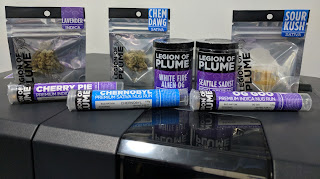
C7500G Printed Cannabis Labels
And Georgetown’s business is growing. According to Mark, “we’re growing, adding new dispensary customers all the time.  The branding and labeling of our premium products is helping our sale team grow our business”.

Green Rush Cannabis and Georgetown Cannabis are approaching their labeling differently; but both are successful in the marketing, branding and labeling of their products.  If you need help to insure your labels represent and promote your brand successfully, contact us.  We’ll help you find the best solution for your print on-demand color label requirements.

Guy Mikel
855-962-7670