Color Label Solutions

Color Label Solutions
www.colorlabelsolutions.com

Wednesday, February 5, 2014

GHSmadeEZ.com

Are you worried about complying with the GHS regulations?

Do you want to make complying with the GHS regulations as easy as possible?


Do you wish you were ready to meet the June 2015 GHS deadline?


GHSmadeEZ.com. www.GHSmadeEZ.com, is designed for those chemical companies who answer “yes” to the questions above.  We take the work and worry out of complying with the GHS requirements.

GHSmadeEZ combines the talents of two great partners; Color Label Solutions, the premier provider of print on-demand color label solutions and KMK Regulatory Services, www.kmkregservices.com, one of the world’s premier GHS Compliance expert who provides expert regulatory and SDS authoring services for manufacturers, blenders and distributors of chemicals.  


Working together, Color Label Solutions and KMK Regulatory Services has created 3 “Bundles” of products and services to make complying to the GHS regulations easy and worry-free; including FREE SDS and GHS Label Format:

·     Print Service: GHSmadeEZ.com will print your GHS Labels for you. When you purchase pre-printed labels, you’ll get durable poly labels and ink that meet the GHS label requirements. All you do is answer a few questions; then apply the labels to your products.


·    Printer Bundle: GHSmadeEZ.com will sell and train you on everything you need to print your own labels. We make it easy to begin printing GHS labels.


·     Variable Bundle: GHSmadeEZ.com will sell and train you to build a database to produce GHS labels using variable data such as Product Identifier, Signal Word, and Hazard Statements. The Variable Bundle is a must when you have multiple products.


When you purchase one of these bundles, you get a Safety Data Sheet (SDS) and a GHS label in a PDF format; FOR FREE!  Plus, we provide discounts for multiple products and larger volumes of labels and printers.  In addition, we can get the exact sizes labels you require; just contact us at 855-962-7670.

You may be wondering, “why do I need a SDS in addition to the GHS label?  According to Dan Lavoie, Executive Vice President Business Development of KMK Regulatory Service, “The final classification of your product must be rendered from the SDS.  We use the exact formulary to calculate the proper classification.  If inconsistencies are found between the SDS and GHS label, the company could be fined; or have product delayed during shipping.  As we stand behind our work, it’s important to us that you don’t have any issues with the documents we produce.”

Continuing, Dan says “With GHS, you need to place the correct color pictogram on your labels.  Given the concern for consistency between the SDS and GHS label, we recommend our customers print the labels in color and on-demand.  With on-demand printing, you will print the latest version of the label, reducing or eliminating the possibility of placing the incorrect version on the product.  “

“In addition, we suggest to our customers; do not cross or black out with a thermal transfer printer any preprinted pictograms.  Crossing or blacking out preprinted pictograms may create confusion with the end user as well as regulatory or government officials; and thus exposing your company to liability.”

For more from Dan and KMK Regulatory Services, check out their regulatory blog on GHS labeling: http://kmkregservices.com/regulatory-blog/.   And be sure to contact us if you need help answering the following questions KMK Regulatory Services poses:

1. Are you aware of the impact of GHS on the classification of your products?
2. Will your cost of transport be affected by the new classifications?
3. Will you be able to market the product in the same way?
4. Does your product classification remain unchanged?
5. Should you consider substituting substances to modify the classification?
6. Are you entering into new markets and want to know how the products are going to be classified?


The idea for GHSmadeEZ.com results from a post made last year on www.colorlabelsondemand.blogspot.com; the second largest-read post out of more than 100. http://colorlabelsondemand.blogspot.com/2013/05/ghs-made-easy.html.  With GHSmadeEZ.com, we take this concept further making GHS even easier and taking the worry out of complying with the GHS requirements.

If you need support identifying the specific changes required to make your labels GHS compliant; or with printing your labels now with color, contact us to learn more about the packages we offer at GHSmadeEZ.com.

Guy Mikel
855-962-7670
#colorlabels

Sunday, January 26, 2014

A Drug By Name

In the article, “A Drug By Any Other Name: Patients' Ability To Identify Medication Regimens And Its Association With Adherence And Health Outcomes,"


the authors evaluated the health outcomes of a group of patients based on their knowledge of the prescribe drug compared to those who identified medication strictly visually.  This article is very good; do read it.  But you can probably guess the results.


It’s pretty clear that understanding your medications and dosages produces better adherence and outcomes compared to only identifying the physical characteristics of the pill itself.  What’s interesting about the study is the authors correlated knowledge with the improved outcomes.

In fact, the authors wrote, “A patient's ability to accurately identify their daily medications is crucial for optimal health.” 

In addition, the authors wrote, “It is possible that patients who use two forms of medication identification (name and visual identification) may have better outcomes.”


Reading this article, I wondered, “what could we do to help patients increase their knowledge of their prescribed medication and dosage?”

From my perspective, the easy-to-do and obvious answer comes from the Institute of Safe Medication Practice and their recommendations for Principals of Designing Prescription Labels: https://www.ismp.org/recommendations/designing-medication-label-community-pharmacy  

From this list, I get 4 easy-to-do ideas that every pharmacist should consider to increase their patient’s understanding and identification of the medication they take:

  •      Use Larger Fonts.  Larger fonts are easier to read and increases comprehension.
  •      Include typographical cues like Bolding and Highlighting.
  •       Maximize whitespace, including line spacing. Older people perceive Whitespace is easier to read
  •      Place a picture of the medication on the label. 


By adding these 4 simple ideas, pharmacists would quickly improve knowledge and identification of the medications taken by their patients.

With traditional vials, however, pharmacists may not have sufficient label “real estate” to make these additions.  By moving to the M-Pack vials, pharmacists get more than 1.8X more label area to make these simple changes.


According to William Negrini, President at M-Pack Systems, “The M-Pack System is the most compliant prescription package in the industry.”  To learn more, you may want to review my earlier post on how Prescript Pharmaceuticals is using the M-Pack vial:  http://colorlabelsondemand.blogspot.com/2013/08/prefilled-prescription-labels.html


And with traditional direct thermal or thermal transfer printers, pharmacists may not have the capability to add identifiable images and highlights to the labels.  With the TM-C3500 color label printer, it’s easy to add larger fonts, bond fonts, highlights, and images. 

TM-C3500

You may want to review how I printed using these ideas on the labels for M-Packs at the recent NACDS show:   http://colorlabelsondemand.blogspot.com/2013/08/pharmacy-labels-print-on-demand-color.html

If you want to improve adherence and patient outcomes easily, move to print on-demand color labels.  You and your patients will like the results.


Guy Mikel
855-962-7670
#colorlabels

Wednesday, January 15, 2014

Color Label Costs

After updating a post on the relative cost of ink, toner and cartridges (http://colorlabelsondemand.blogspot.com/2013/12/trust-me.html), I decided to look at the relative cost of label media among the 3 main types of on-demand color label printers that Color Label Solutions sells;  laser, inkjet, thermal transfer. 


Before I start, you may be wondering, what are the differences among the different types of label media?  You may want to review my earlier post, “All Labels Are The Same-NOT” http://colorlabelsondemand.blogspot.com/2012/07/labels-are-all-same-not.html.   In this post, I describe the different components of labels and the differences between label types.

To compare label prices, I asked David Gustafson, Business Development Manager of UPM Raflatac ((http://www.upmraflatac.com/northamerica/eng/) to give me the relative prices of the different label media types.  UPM Raflatac is a globally leading supplier of pressure sensitive labelstock. UPM Raflatac's labelstock products are designed to meet the needs of demanding applications in a vast array of end-uses.  Supplying all-types of label stocks globally, UPM is in a perfect position to provide the relative costs of the different media.

Based on the information I received from David, I put together the following chart:


From this information, it is easy to see that thermal transfer, both paper and film, is the least costly type of label media.  According to David, “thermal transfer labels are produced in tremendous volumes.  With such large production and demand, thermal transfer labels cost much less to produce.”  For example, Zebra sells a basic white paper shipping label, 4” x 6” die cut thermal transfer for $66.80 per case of 4 rolls of 1,000; $0.0167 each. http://www.zebra.com/us/en/products-services/supplies/labels-tags.html

David continues, “coating films such as polyester or polypropylene require more expertise and costs.  Therefore, these labels are more expensive, even for thermal transfer printers.”  For example, Zebra sells a Kimdura polypropylene 4” x 6” die cut label for $991.08 for a case of 36 rolls of 80 labels; $0.344 each.  In addition, Zebra sells a polyester 4” x 6” die cut label for $553.63 for a case of 4 rolls of 960 labels; or $0.144.  Color Label Solutions sells a 4” x 6” poly die-cut label for the CAB XC Series Two-Tone printers for $396.00 for 4 rolls or 1,050 labels; or $0.094.  http://stores.colorlabelsolutions.com/4-x-6-4thermal-transfer-labels-for-cab-printers/

Labels for laser/LED printers have costs similar to thermal transfer printers.  “At UPM Raflatec, we have lots of different types of paper and film label products that work well with laser and LED printers”, says David.  From my work, it is important to find labels for laser and LED printers that not only print well, but also work well with sheet fed media handling.

Labels for inkjet printers, both paper and film, cost more.  David says, “at this time, the volume of production is much lower for inkjet printers; thus increasing the cost of production.  As the market demand grows, the cost of inkjet labels should reduce.”  As a comparison, Color Label Solutions sells a 4” continuous roll of inkjet matte paper labels for $98.00 for a case of 12 rolls of 1,200”; or $0.04 per 4" x 6" label.  Using inkjet gloss paper, the cost per 4” x 6” label is $0.061.  And for inkjet poly, the cost per 4” x 6” label is $0.076.  Please know: die cut labels would be more expensive than continuous.  You can see the prices for labels in our store at http://stores.colorlabelsolutions.com/labels/.  Contact me if you want specific die cut label sizes.

Based on this analysis, I recommend you look at the total cost of your labeling solution; including hardware, ink and media costs. Total costs are especially important when using film-based labels such as GHS label printing.  At Color Label Solutions, we’ll help you find the best solution to fit your requirements.
 

Thursday, January 9, 2014

GHS Drum Labels

Color Label Solutions now has a new option for you to print #DrumLabels.


In the past, I have written several posts covering the basics of printing of #GHSLabels. 

Including success stories:


All of these posts have involved the use of inkjet printers.  For drum labels, I have been recommending the GP-C831.  To purchase the GP-C831, visit our store: http://stores.colorlabelsolutions.com/gp-c831-8-4-color-label-printer/.

But not everyone wants to use this technology.  For customers who want to use less expensive printers and label media, require higher resolution images, must print using PCL or PostScript drivers, or need full 8.5” wide labels, Color Label Solutions now offers the Okidata C711 printer specifically for chemical drum labels;  http://www.okidata.com/printers/color/c711/overview


With low cost printer hardware and labels, resolution up to 1,200 x 600 dpi, and available PCL and PostScript drivers, the C711 fits many chemical companies who need to begin printing drums labels for their chemicals.

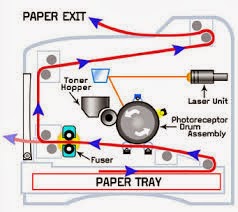
We selected the C711 for one key reason; straight paper path.   Laser printers require the media to travel around a drum to print.


This curved paper path along with the heat may cause issues with the facestock and liner of the label separating, jamming the printer.  Once jammed, it’s not easy to clear the media path, thus potentially stopping production.

With a straight path, the C711 has no issues printing labels that are heavier than standard paper.


In addition to the straight paper path, the C711 has one other feature making it a great option to print GHS drum labels; price.  At $999, no other viable printer for large quantities of GHS labels is less expensive.  If you are looking for a low cost option, the C711 is for you.  To purchase the C711, visit our store: http://stores.colorlabelsolutions.com/okidata-c711/ 

Check out this video of the C711 printing a sample GHS label along it’s straight paper path: 


When you need GHS Drum labels, contact Color Label Solutions.  We’ll find the right solutions for your situation.


Guy Mikel
855-962-7670
#colorlabels
@colorlabelguy

Sunday, December 29, 2013

Trust Me!

Recently, I received an email stating that I had “MISLEAD” people on my blog post, “Thermal Transfer vs Inkjet” that I posted February, 2013 (http://colorlabelsondemand.blogspot.com/2013/02/thermal-transfer-vs-color-inkjet.html).  In this post, I compared the ink costs of thermal transfer, laser and inkjet label printers to produce ISO Standard Documents.


According to the person who contacted me, I overstated the costs of ribbons by “100% to 300%”.  “By using ribbon prices from Zebra, the industry leading manufacturer of thermal transfer printers, you did not reflect accurately the “market prices” of thermal transfer printers” stated the person.  Continuing, the person wrote, “Zebra commands a dominate market position; therefore can charge 100% to 400% higher prices than other ribbon resellers.” 

Given the prices on the Zebra.com site, this person suggested I use prices from Uline to better reflect real market prices: http://www.uline.com/BL_5100/Industrial-Thermal-Transfer-Ribbons.

 In addition, this person stated I had used old information concerning the price increases in thermal transfer ribbons.  In my previous post, I referred to statements from VDC and IIMAK in 2011 about potential price increases on thermal transfer ribbons.  In my post, I wrote, “It seems the same films used in thermal transfer ribbons are being used in more profitable applications such as flat screen displays.  VDC predicts users may switch to a different technology away from thermal transfer.”

After reading this email, I realized that I had just received another good idea for a post to my blog.  I decided to update the calculations using the Uline prices; as well as confirm the latest Zebra ribbon prices (the ribbon prices on Zebra.com had not changed) and add the prices for the black and red resin ribbons for the CAB Two-Tone printer that Color Label Solution sells.

As a refresher, I utilized 5 standard ISO documents to determine the cost per page of the selected laser printers.  To learn more about this analysis, review my earlier post:  http://colorlabelsondemand.blogspot.com/2013/02/laser-versus-inkjet.html. For the inkjet printers, Epson estimated the yield to print the 5 documents to calculate the cost per page.  For the thermal transfer ribbons, the cost is a function of the size of page.

After adding the Uline prices, confirming the Zebra ribbon prices, and inserting the prices for the black and red ribbons for the CAB two tone printers, here is the new cost comparison in terms of MSI (thousand square inches):

Ink Cost/ MSI Of Various Label Printer Technologies
Based on these latest results, my interpretation seems to remain the same.  First, the cost to print using the TM-C3500 or GP-C831 is not significantly different than thermal transfer printers (assuming ISO standard coverage).  Second, if you need to use resin ribbon to meet your durability needs or the BS5609 requirements for marine shipments, the ink costs from the TM-C3500 or GP-C831 may be less. 

In addition to the previous two interpretations, I added a new observation from my analysis; if you want to use thermal transfer ribbons to produce GHS labels, contact Color Label Solutions.  The ribbon prices for the CAB two-tone printer from Color Label Solutions is much better than the resin ribbon prices from either Zebra or Uline.

In my analysis, please remember one key caveat:  Coverage.  If you look at the ISO standard documents, coverage may be less than the coverage utilized in your labels.


For the inkjet and laser estimates, the costs increase substantially with increased coverage.  For thermal transfer, however, the costs remain the same whether the coverage is 1% or 100%.  Therefore, you may have a lower ink costs by using thermal transfer printers when print coverage is high.

Also, please remember this analysis is only for ink costs.  Label media costs differ among the three technologies as well.  I plan to compare the cost of labels for all three types of printers in an upcoming post.

All three technologies may be used to produce GHS Labels.  Check out Color Label Solutions for different options to meet your GHS label requirements: http://colorlabelsolutions.com/Chemical-Manufacturing.html. #GHSLABELS

If you need help deciding which technology to utilize for your labels, contact Color Label Solutions (www.colorlabelsolutions.com).  We’ll find the best solution to meet your requirements. #COLORLABELS.

Guy Mikel
855-962-7670

Sunday, December 15, 2013

EVERYONE

After spending Sunday preparing Christmas Cards,


I have decided, EVERYONE NEEDS A COLOR LABEL PRINTER!

Having a color label printer allows you to create and apply original content on cards, envelopes and packages.  Let me explain what I did for my cards; and how I personally use a color label printer for business.

For my cards, I wanted to insert a person message, reinforcing my business.  Positioning yourself and your business is very important especially in this time when everyone is bombarded with so much information.  I want everyone to see Color Label Solutions (www.colorlabelsolutions.com) as the premier provider of print on-demand color label solutions.

Using BarTender (http://www.bartenderbarcodesoftware.com/label-software/welcome.aspx) from Seagull Scientific, I created a holiday message with images and color text:


After creating, I printed the message on a 2” continuous label and inserted inside my Christmas cards along with a hand-written person message.  If you have seen my handwriting, you understand why it is important for me to use a printer as much as possible.

After inserting the printed message along with my handwritten note inside the card, I printed a 4” x 2” address label on a continuous matte paper label that includes the Color Label Solutions logo:


Not only serving its function, the address label promotes the business as well.  Plus printing labels with a color label printer is much easier than using a desktop printer to print one label on a page full of Avery sheet-fed labels. How many do you waste?

Also, I use the address labels for all the print samples I send.  You may have received a package with this style of printed label:


Again, a color label printer makes creating impactful labels, that everyone will read, Easy To Do.

Next time you send a letter, card or package, think about how a color label would positively impact your business; and save you time!

Guy Mikel
855-962-7670

Thursday, December 5, 2013

Chemical With No Name

Although Marketing from the new owners of my customer would not allow me to use their name, I decided to post a slightly altered version.  With the requirement to produce GHS labels coming, I hope you find this version of the post of value.


GHS-Label

As a global manufacturer of specialty chemicals and gasses, my customer needed to comply with the Global Harmonized System of Classification and Labeling of Chemicals, commonly referred to as GHS.  If you have not heard of this new set of requirements, you may want to read my earlier post: http://colorlabelsondemand.blogspot.com/2012/03/what-h-is-ghs-opportunity.html.   

All companies who manufacture chemicals will need to comply with these new requirements by June 1st, 2015 according to OSHA: https://www.osha.gov/dsg/hazcom/HCSFactsheet.html.

For companies that ship chemicals by water, they’ll need to comply with the British Marine Standard, BS5609.  Here is a summary of these set of requirements from an earlier post: http://colorlabelsondemand.blogspot.com/2012/03/bs5609-is-no-bs.html.

I first contacted my chemical company prospect when they wanted to test labels printed with ink from the GP-C831 color label printer.  You may find my largest read post on this printer of interest:  http://colorlabelsondemand.blogspot.com/2012/10/gp-c831.html.

According to Information Systems Director at my customer, “We needed to make sure the labels would meet our set of requirements.  After receiving the printed labels, we placed them on packages and placed them outdoors to see how they would survive the elements.  After several months, the labels looked good.”

Once the tests showed the label meet their durability requirements, the specialty chemical company had to decide which printer to purchase.  Although initially interested in the GP-C831, the Director stated, “The TM-C3500 may be a better fit for us.  But we need to make sure we can get the Kimdura label media in 4” widths”.  I responded, “The TM-C3500 has a max print width of 4.4”.  If your labels are less than this width, the TM-C3500 would work better for you.  With the build-in cutter, you can use continuous labels and cut to a variable length.  So some labels can be 6”; others 8”.  You can change easily on the fly and automatically.  Also, the printer uses exactly the same ink as the GP-C831; so the Kimdura works the same in the TM-C3500.”

Based on their requirements, the chemical company purchased several TM-C3500’s for their plants as well as purchased continuous Kimdura poly labels.  During the initial install of these printers, the company did have an issue getting the printers to work correctly.  The “Printer Settings” application did not communicate to the printer correctly.  You can find the printer settings on the Maintenance & Utilities tab: 


This utility configures all settings in the printer.  To fix this communication problem, we reinstalled the driver using the Epson Install Navi Utility, which is an application to set up the printer, including setting up Ethernet connectivity.  You can find this Utility on the Tech Resource page for the TM-C3500 here: https://pos.epson.com/developers/techresdetails.htm?productpk=696. After using the Install Navi Utility, the printers communicated correctly. 

According to the Director, “label printing is going well.  We use Hazox (http://exphazox.com/hazox/)  as our software application to print the variable SDS and GHS information.  Although we have a lot of information to fit on a little area, the labels are working out.”


Although disappointing that I could not use the name of my specialty chemical company customer, I hope you found this information of value.  If you need to meet the GHS requirements like this specialty chemical company, contact Color Label Solutions.  We’ll provide you with the best solution to meet the GHS requirements to print color labels on-demand.

Guy Mikel
855-962-7670
www.colorlabelsolutions.com
#GHSlabels